
Audio steganography
Audio carries hidden data in ways an image cannot: a message can be drawn in the frequency spectrum, encoded in sample LSBs, or transmitted as a signal (DTMF, SSTV, Morse, FSK) that needs the right decoder. When you get an audio file, always look at the spectrogram first.
Spectrogram (always first)
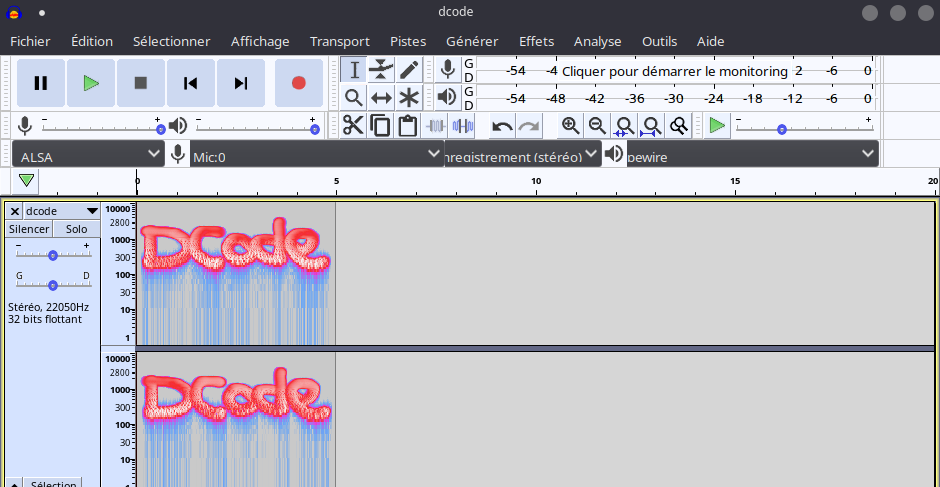
The most common audio trick by far: text or a QR code painted into the frequency domain. It is inaudible in normal playback and invisible in the waveform, but jumps out of a spectrogram.
- Audacity — switch the track to Spectrogram view; adjust the frequency range, switch to log scale, and raise the contrast.
- Sonic Visualiser — Layer > Add Spectrogram; better color maps for faint marks.
- CLI one-shot:
$ sox file.wav -n spectrogram -o spec.png
$ sox file.wav -n spectrogram -o spec.png -X 200 -Y 2050 -z 120   # high-res
$ ffmpeg -i file.wav -lavfi showspectrumpic=s=1920x1080 spec.png  # ffmpeg
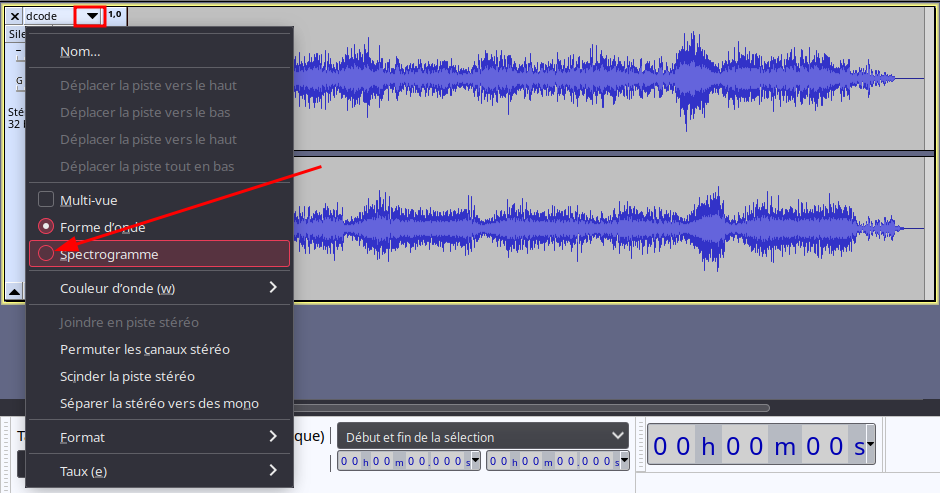
Zoom out (right-click the scale) or switch to logarithmic mode to see the whole range.
Regenerate at high resolution before giving up
The #1 audio miss: a default-resolution spectrogram smears faint text into
an unreadable band. Re-render with sox … -X 200 -Y 2050 (-X px/second,
-Y height, -z dB range) or a large ffmpeg showspectrumpic=s=… before
concluding "nothing there". Also scan above 20 kHz and below 20 Hz.
Worked example: text painted in the spectrogram
A challenge.wav sounds like static and its waveform is a featureless
block. Render the frequency domain — sox challenge.wav -n spectrogram -o
spec.png — and the flag is drawn as text between 2 and 8 kHz. If it looks
smeared, re-render sharper with sox challenge.wav -n spectrogram -o spec.png
-X 200 -Y 2050 -z 120 and scan above 20 kHz before giving up.
Spectrogram difference. Given both an original and a modified file, render
both at identical -X/-Y and subtract them (PIL ImageChops.difference) to
cancel the shared carrier and leave only the injected text.
Stereo channel tricks
A stereo file has two channels — and a message often lives in only one, or in the difference between them (silent when the channels are summed to mono).
$ sox in.wav left.wav  remix 1        # isolate the left channel
$ sox in.wav right.wav remix 2        # isolate the right channel
Left − Right difference (Audacity): split the stereo track, Invert one channel, set both to the same side, then Mix and Render — identical content cancels and only the L−R payload remains (Amplify to bring it up). Always try this when both ears sound the same but the spectrogram is empty.
Reverse and slow down
Garbled, "chipmunk", or backwards-sounding audio is a cue to transform it before giving up:
$ sox in.wav out.wav reverse          # play backwards
$ sox in.wav out.wav speed 0.5        # slow a sped-up recording
Audacity's Effect → Reverse and Change Speed/Tempo do the same interactively.
Sample LSB (WAV)
Lossless WAV samples have LSBs just like image pixels. If the spectrogram is clean, extract the LSBs:
$ stegolsb wavsteg -r -i file.wav -o out.txt -n 1 -b 1000
Try -n 2 for two-bit encodings, and inspect the result with
file out.txt / xxd.
The payload rarely starts at sample 0
WAV-LSB challenges commonly pad the front with silence: in one well-known
challenge the LSBs were 0x00 until sample 1,146,416 before the message
began. If the output is a wall of null bytes, the data is further in — carve
past the leading zeros (xxd out.txt | grep -m1 -v ' 0000 0000' finds the
first non-zero offset). Always try both -n 1 and -n 2, and don't set -b
so small that it truncates the flag.
Signalling: DTMF, SSTV, Morse, FSK
Audio is a communications channel, and CTFs reuse classic encodings:
| Encoding | What it is | Decode with |
|---|---|---|
| DTMF | Phone-keypad dual tones | multimon-ng -t wav -a DTMF file.wav |
| SSTV | Slow-scan TV — images over audio | sstv -d file.wav -o out.png, QSSTV |
| Morse | On/off tones, visible in the waveform | multimon-ng -a MORSE_CW / by ear |
| FSK / modem | Frequency-shift keying | minimodem -r -8 -f file.wav 1200 |
DTMF output is often ASCII-decimal separated by # (e.g. 65#80#82#...) —
decode with "".join(chr(int(x)) for x in s.split("#")).
FSK / minimodem — try the common bauds (300, 1200, 2400, RTTY 45.45);
if none work, read the two tone frequencies off Audacity's Plot Spectrum and
pass them explicitly: minimodem -r 100 -M 18000 -S 1952 -f file.wav (-M mark
Hz, -S space Hz).
SSTV — the headless sstv tool auto-detects the mode; the challenge title
often hints it ("Scottie", "Robot", "Martin"). A decoded SSTV image frequently
carries a second layer (a base64 string or a password). Live-decoding in
QSSTV reads from the sound card, so route the file through a loopback /
monitor device (PulseAudio "Monitor of…") rather than feeding the file directly.
Isolate one channel first (sox in.wav ch.wav remix 1) when only one side
carries the signal.
Convert the sample format before decoding tones
multimon-ng reliably reads only raw 16-bit, 22050 Hz, mono, and
minimodem is picky about floating-point streams — feed either a
44.1 kHz / stereo / float WAV and it silently decodes nothing. Normalize
first, then pipe raw:
console
$ sox in.wav -t raw -r 22050 -e signed -b 16 -c 1 - | multimon-ng -t raw -a DTMF -
A wrong baud or wrong rate yields pure garbage, not a partial decode, so sweep the standard values.
Password-protected containers
- steghide hides data in WAV and AU with a passphrase — try the empty password, then a wordlist.
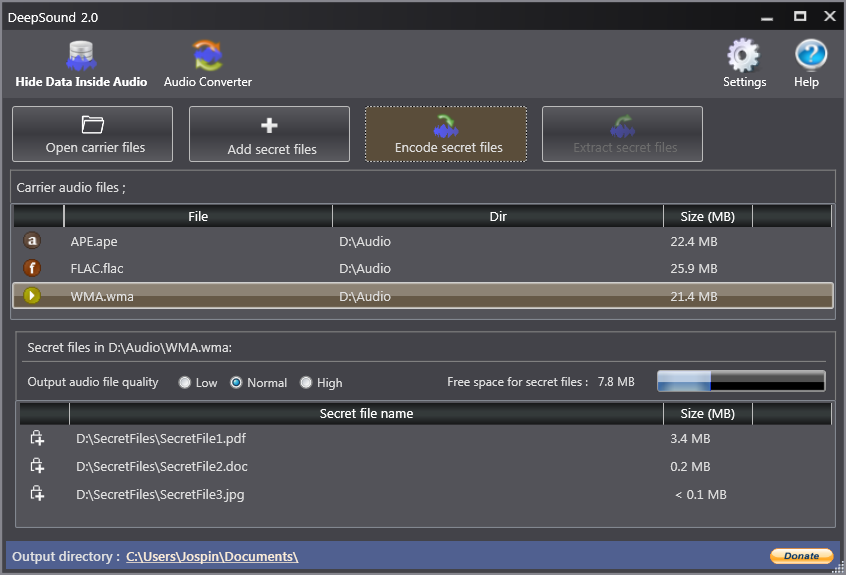
- DeepSound is a popular Windows CTF tool that hides (AES-encrypted) data in
WAV/FLAC/MP3/APE. Guess the key from the media, filename or challenge name — or
crack it: DeepSound validates the password against a SHA-1 of the padded AES
key stored in the header (not the ciphertext), so pull that hash with
deepsound2john.py secret.wav > ds.hashand runjohn --wordlist=rockyou.txt ds.hash. Don't waste time on steghide/binwalk first — the DeepSound header magic identifies these files.
- MP3Stego hides data during WAV→MP3 compression (in
part2_3_length), so it leaves nothing for strings/binwalk/spectrogram. Extract with the matching decoder and the password:decode -X -P <password> stego.mp3(writesstego.mp3.txt); the password usually comes from an earlier stage, and the output is often further base64/base32-encoded.
Phase and echo hiding leave no spectrogram trace
If LSB, spectrogram and channel tricks all come up empty, the data may be in the phase of frequency components or in an inaudible echo — neither changes amplitude, so neither shows on a spectrogram. Inspect phase (Sonic Visualiser) or the cepstrum/autocorrelation for a repeated delayed copy.
WAV header tricks
Like PNG, a WAV file stores its data length in the header. Shrinking or growing
the DataSize block with a hex editor can hide or reveal a trailing section of
the audio — check whether the declared size matches the file.
Related
- Drive a challenge from the cheatsheet.
- Raw, headerless audio: import it into Audacity via the methodology raw-data tips.